


Silent Thunder: A-10 Tank Killer 2: Deadzone defeated!

This is a guide on fixing the onerous deadzone problem present in Silent Thunder: A-10 Tank Killer 2.
The previous Silent Thunder guide, Silent Thunder: A-10 Tank Killer 2: Boxing clever to defeat the dead zone, covered an alternative mapping profile to try to solve the problem of an extensive deadzone on the x and y axes.
Although this alternative profile helped, it wasn;t as intuitive and required careful flying.
Contents
Strategy
This time we'll be using vJoy coupled with a Joystick Gremlin profile, this time using intuitive controls coupled with deadzone handling to finally fix these issues. An improved choice of a CH Flightstick Pro and CH Pedals as the HOTAS device in 86Box and Win98 will complete the setup.
This is a supplemental article only and to setup other game components, the original Silent Thunder: A-10 Tank Killer 2: Boxing clever to defeat the dead zone, guide should be iued.
Compatibility tools configuration
For this solution the vJoy/Joystick Gremlin combo will be used to correct the deadzone issue. Joystick Gremlin (JG) is used to set a deadzone on our joystick response for x and y axes. This effectively causes the joystick response to 'jump past' the in-game deadzone on these axes providing more responsive behaviour.
Each tool will be configured manually in addition command line options are provided which would prove useful for inclusion in startup scripts. Further details on command line options can be found in Controllers and retro sims part 10: vJoy/Joystick Gremlin/HidHide command line options.
vJoy config
Silent Thunder supports 4 axes (x, y, z and rotation x), 8 buttons (although the device emulated in 86Box will be a 4 button CH Flightstick Pro) and a single POV hat.
In vJoy this is configured as follows:
vJoyConfig.exe Enable on
vJoyConfig.exe 1 -f -a X Y Z Rx -b 4 -p 1
Joystick Gremlin config
The Joystick Gremlin configuration is a key part of the solution. Instead of mapping directly to a vJoy axis the x and y axes are modified by a JG response curve prior to mapping to a vJoy axes as shown in the screenshot:
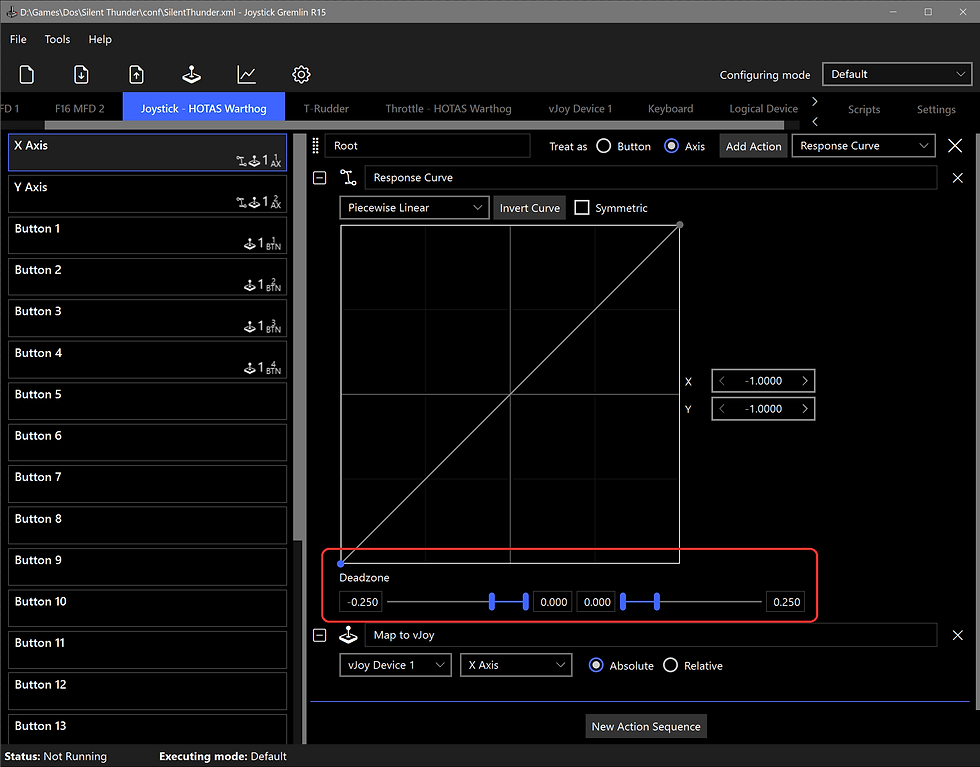
The joystick x and y axis have a deadzone added with the Response Curve action. A deadzone of 0.25 is applied, (highlighted in red), although the exact value may be dependent on the physical joystick.
It is recommended to use the cursor keys to precisely define equal dead zones on each side of the centre point.
Once the dead zone is defined the Map to vJoy action is added.
The example above shows the response curve for the x-axis. The response curve for the y-axis is identical.
The command line options to load and start a Silent Thunder profile (SilentThunder.xml) are:
"X:\<path to>\joystick_gremlin.exe" --start-minimized --enable --profile "X:\<path to>\SilentThunder.xml"HidHide config
In this instance HidHide is not required and can be omitted or left disabled. This is due to 86Box joystick input settings allowing a particular device to be selected, in this case the vJoy virtual controller, and ignoring other controllers.
Emulation configuration
The following section covers the HOTAS configuration by emulation components, the 86Box emulator and Win98 OS running within the emulator.
86Box HOTAS config
The 86Box configuration remains identical to the original virtual machine in Silent Thunder: A-10 Tank Killer 2: Boxing clever to defeat the dead zone, except for the following joystick input device:
Input devices
Joystick: CH Flightstick Pro + CH Pedals
If an 86Box profile already exists for Silent Thunder, this profile can be modified. The input device settings and vJoy to CH Flightstick Pro + CH Pedals mappings are shown below:
Input device setings. vJoy to CH Flightstick Pro + CH Pedals mappings.
Win98 HOTAS config
In Control Panel the Game Controllers option allows a CH FlightStick Pro to be added. As pedals are also available the rudder option is checked. For those without a rudder axis this can be omitted. Finally the CH FlightStick Pro is calibrated and once calibrated can be tested.
Adding the CH Flightstick Pro. Once calibrated it can be tested.
In-game configuration
The In-game configuration remains unchanged from Game config in Silent Thunder: A-10 Tank Killer 2: Boxing clever to defeat the dead zone.
Finally...
Credit and thanks in providing a Silent Thunder deadzone solution goes to:
The developers of 86Box.
The developers of vJoy and Joystick Gremlin.
Good hunting!


Comments