


VirtualMIDISynth and MIDIMapper
A quick guide on using the CoolSoft MIDIMapper and why you may want to use it. This is something I've ended up looking into recently, and it seems very useful info for those looking at some of the retro sims/games out there, that use MIDI.
In a previous article DOSBox Staging and VirtualMIDISynth, the CoolSoft VirtualMIDISynth and it's use with DOSBox Staging was covered. This article will be covering the CoolSoft MIDIMapper and it's use with VirtualMIDISynth, DOSBox and PCem.
What is it?
Put simply the MIDIMapper is software which allows you to choose a default MIDI device to play your MIDI music through. Win10 has a single default software MIDI device, Microsoft GS Wavetable Synth. If you install another software MIDI device like VirtualMIDISynth, then you can use the MIDIMapper to use VirtualMIDISynth (or another software MIDI synth) as the default device, rather than the Microsoft Synth.
Why you need it?
Later versions of Windows from XP onwards have removed more and more MIDI functionality, until with Win10 we have only the default Microsoft Synth. If your game or software supports selecting a MIDI device then you can choose a different one, but if it doesn't you're stuck with the default Microsoft Synth.
The MIDIMapper software adds back the ability to choose a MIDI device. For a far more detailed and accurate description of the issue, check out the CoolSoft MIDIMapper page.
How to use it
It's a very simple process, basically you need to:
Download the MIDIMapper from the CoolSoft MIDIMapper page.
Install it.
Run the MIDIMapper Configurator.
Choose your preferred default MIDI device.
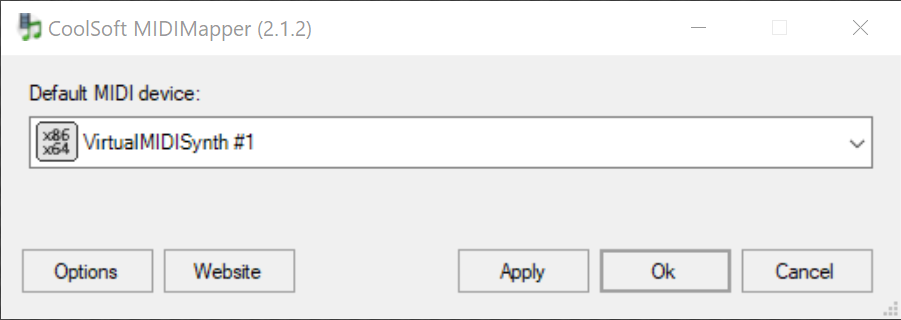
If you already have VirtualMIDISynth installed the MIDIMapper integrates with VirtualMIDISynth and can be configured from the MIDIMapper tab in VirtualMIDISynth, so:
Download and install the MIDIMapper.
Run the VirtualMIDISynth Configurator.
Select the MIDI Mapper tab.
Choose your preferred default MIDI device.

When to use it
Here are some examples I've encountered.
DOSBox Staging
The advice from CoolSoft is to use the MIDIMapper if the game/software doesn't support the selection of a MIDI device.
Since DOSBox does support selecting a MIDI device, the mapper doesn't have to be used and the existing process should be followed (see DOSBox Staging and VirtualMIDISynth).
PCem
When creating a virtual machine with the Creative AWE32 sound card you can select device configuration options and select a MIDI device to use (so in theory the MIDIMapper doesn't have to be used).
However when selecting VirtualMIDISynth, PCem still seemed to use the default Microsoft Synth device.
Setting VirtualMIDISynth in the MIDIMapper, and then selecting the MIDIMapper as the MIDI out device in PCem, caused VirtualMIDISynth to be used instead.
AWE32 configuration, note the settings button. Using the MIDIMapper in the AWE32 device config
F22 Air Dominance Fighter
The classic Digital Image Design (D.I.D.) Win95 sim F22 Air Dominance Fighter uses MIDI music with it's own F22 soundfont. Once an F22 ADF installation is copied into WIn10 there are no options to choose a MIDI device or use the F22 soundfont.
VirtualMIDISynth can be set in the MIDIMapper as the default MIDI device,
VirtualMIDISynth can load the F22 soundfont.
When the game starts the authentic retro MIDI music is played!
Finally
Credit and thanks to the CoolSoft devs for some useful and easy to use MIDI software to help us get that authentic retro soundtrack back!
Happy listening!

Thấy mọi người bàn chuyện soi cầu ngày 3 9 2026 nên mình ghé thử cho biết, cũng hơi nghi ngờ kiểu trang nào cũng nói “chuẩn” nhưng thôi cứ xem. soicauxsmb24.com vào thì không bị rối mắt như mình tưởng, họ tách phần “Soi cầu MB ngày 3 9 2026” riêng ra nên nhìn cái là biết đang đọc đúng chủ đề chứ không lẫn sang mục khác. Mình chỉ lướt nhanh thôi mà vẫn bắt được ý họ nói về thống kê, phân tích kết quả quay trước để gợi cặp số trong ngày (đọc kiểu này đỡ phải đoán họ đang viết gì). Kéo xuống từng khối nội dung gọn, tiêu đề ngày tháng nổi bật ở…