


DOSBox Staging and MIDI
Updated: Jun 21
VirtualMIDISynth and MIDIMapper are optional MIDI tools that can be used by DOSBox Staging and games supporting MIDI music. However with the latest config changes in DOSBox Staging v0.83.0-RC1 it may be worth taking another look at DOSBox MIDI both built-in and external synths in Win10/11.
Further information on obtaining and installing these tools can be found in VirtualMIDISynth and MIDIMapper. They are not required and existing DOSBox facilities can do the job but these tools may prove more convenient.
VirtualMIDISynth is a Win10/11 software MIDI synth that supports soundfonts. It does the same job as FluidSynth built into DOSBox Staging (which also supports soundfonts). However, with VirtualMIDISynth the soundfont can be changed 'on-the-fly' as the game is running allowing many soundfonts to be tried and tested.
Changing soundfonts with fluidsynth requires shutting down DOSBox changing the soundfont in the config and restarting DOSBox.
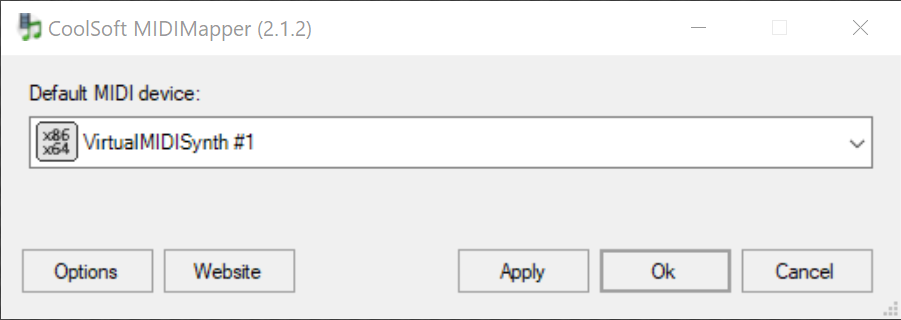
MIDIMapper is a Win10/11 MIDI synth selector. It can be used to select the default Microsoft Synth, VirtualMIDISynth or another MIDI synth that may be installed in Win10/11 (e.g. a Yamaha synth).
This is another optional tool as the DOSBox config and DOSBox commands can be used to send MIDI music to a specific Win10/11 synth. Alternatively DOSBox can sent MIDI music to the MIDIMapper and let it decide the Win10/11 synth that should be used.
The following example demonstrates how the same result can be achieved using the different tools:
DOSBox is configured to send MIDI music to the built-in FluidSynth. FluidSynth is using soundfont X.
DOSBox is configured to send MIDI music to VirtualMIDISynth. VirtualMIDISynth is using soundfont X.
DOSBox is configured to send MIDI music to MIDIMapper. MIDIMapper is configured to send MIDI music to VirtualMIDISynth. VirtualMIDISynth is using soundfont X.
Example DOSBox config
For the purposes of this article we'll assume there is an example DOSBox config with MT32, FluidSynth and Sound Canvas components configured, as shown in this config:
[mt32]
model = cm32l
romdir = "D:\Midi\Versioned"

[fluidsynth]
soundfont = "Shan SGM Pro 14.SF2"
soundfont_dir = "D:\Midi\Soundfonts"

[soundcanvas]
soundcanvas_model = sc55
soundcanvas_rom_dir = "D:\Midi\soundcanvas\ROMs"

[midi]
mididevice = mt32
midiconfig = 0
Finding MIDI components
We can find a list of MIDI components configured in DOSBox by running the following DOSBox command:
C:\> mixer /listmidiFrom this we get the following pages of results:
mixer /listmidi results page 1 mixer /listmidi results page 2
The mt32 section shows the valid Roland devices available from the Roland ROMs found in the Roland ROM path.
The the mt32 section we can see an active CM32L device (in green text). This is the device set in the config file.
The soundcanvas section shows the valid Sound Canvas devices available from the Sound Canvas ROMs folder.
The fluidsynth section shows all of the soundfonts discovered.
The win32 sections shows external (to DOSBox Staging) MIDI devices in Win10/11.
Device 0 is the MIDIMapper device, a MIDI synth selector.
Device 1 is the default Microsoft GS Wavetable Synth always present in Win10/11.
Device 2 is VirtualMIDISynth.
Using DOSBox Staging MIDI components
The [midi] section of the DOSBox Staging config determines the built-in component that will handle MIDI music. Some examples:
[midi]
mididevice = mt32
mididevice = fluidsynth
mididevice = soundcanvas
The midiconfig setting has no effect when using a built-in component.
The Roland MT32 option is strictly speaking not a General MIDI (GM) device but a General Standard (GS) device. General Standard is General MIDI but with a lot of propriety Roland extras added.
The difference in General MIDI (GM) and General Standard (GS) devices is why there is often a Roland sound (MT32, CM32L or LAPC-1) option and a General MIDI option when installing or configuring games.
Each option has its own section in the DOSBox config for configuring the device, e.g, [mt32], [fluidsynth] or [soundcanvas].
Using external MIDI components
By external we mean external to DOSBox Staging, so not an internal built-in DOSBox component.
The [midi] section of the DOSBox Staging config allows the use of external MIDI components with:
[midi]
mididevice = port
Or the following DOSBox command can be run from within DOSBox:
C:\> config -set midi mididevice=portThe mixer /listmidi command has provided a list of Win10/11 MIDI devices:
Device 0: MIDIMapper.
Device 1: Microsoft GS Wavetable Synth
Device 2: VirtualMIDISynth
We can choose a synth to use directly with the midiconfig setting, the midiconfig setting matching the device to use, e.g. to use VirtualMIDISynth:
[midi]
mididevice = port
midiconfig = 2
Or the following DOSBox command can be run from within DOSBox:
C:\> config -set midi midiconfig=2We don't have to choose a MIDI synth, we can select the MIDIMapper and let it decide which Win10/11 MIDI synth should be used. To use the MIDIMapper:
[midi]
mididevice = port
midiconfig = 0
Or the following DOSBox command can be run from within DOSBox:
C:\> config -set midi mididevice=port
C:\> config -set midi midiconfig=0
Finally...
Credit and thanks go to:
The CoolSoft developers of VirtualMIDISynth and MIDIMapper.
John Novak and the rest of the DOSBox Staging team.
Good hunting!

Comments