


Frontier: Elite 2: Pushing back the staging frontiers

A guide to running the classic space sim Frontier Elite II (FE2) on modern hardware with DOSBox Staging and natively in Win10.
Frontier: Elite II marked a significant departure from the existing Elite universe. The game-like space flight controls are replaced with Newtonian physics. The species making up GalCorp are replaced with a simulation of the galaxy populated by the human only Federation and Empire superpowers. There is no plot to follow, so you have the freedom to become a trader, miner, pirate or a freelance agent for the Federation or Empire, some or all of the above!
Note: This article is only covering Frontier: Elite II, the sequel Frontier: First Encounters is not covered.
Strategy
The DOS version will run in the latest version of the DOSBox Staging emulator (v0.83.0-RC1 at the time of writing). The Windows port of FE2 is glFrontier, it does not require the DOS version to run.
Version & patch history
Initial UK release (October 1993)
The initial UK release was supplied on 1 or 2 x 3.5" Double Density (DD) floppy disks. The first disk containing the game and installer and the optional second disk containing 5 alternate starting scenarios.
This was considered a rushed release and the game contains a number of bugs including:
Passenger bug.
Wormhole bug.
Bribe bug.
ELITE bug.
Mining bug.
Imperial ship bug.
Cemiess negative price bug.
Despite these issues some FE2 veterans still consider this to be the optimum version as it was believed the wormhole bug enhanced the game. This is not a recommended version, as later versions have most of these bugs fixed.
Most full priced retail version included a manual, quickstart guide, a gazetteer (a list of notable systems) used in conjunction with the systems map and 'Stories of life on the frontier', a collection of short stories set in the FE2 galaxy.
Mining bug patch (October 1993)
A patch created by Steve Critchlow that fixed the mining bug that would cause a crash after leaving an unattended MB4 mining machine in a system.
This is a file replacement patch, once downloaded the zip archive is extracted into the game folder replacing a single file. This patch is only recommended for the initial UK release.
This patch is available from:
First Encounters (courtesy of the Wayback Machine).
CD release (March 1994)
The CD release has most bugs fixed, with only the bribe bug remaining. Distributed on a single CD. This version included all the FE2 documentation. This is a recommended version.
International release (August 1994)
The worldwide release has most bugs fixed, with only the bribe bug remaining. Distributed on 1 or 2 x 3.5" Double Density (DD) floppy disks. This version included all the FE2 documentation. This is a recommended version.
Digital release (June 2001)
Also known as the shareware release, it was distributed as a zip archive. This was an official distribution via the Elite Club website. This version is fully patched and includes the copy protection codes. This is a recommended version and probably the easiest to obtain.
This version does not include complete documentation, however it is complemented with a version of the manual in html format, and a separate copy protection document, available from Elite Club. This version can be obtained from:
Elite Club (game, manual and copy protection, courtesy of the Wayback Machine).
Life on the Frontier (game, manual and copy protection).
Retail media
Due to the age or the media and the drives required to read the media, it is recommended to rip floppy and cd-rom media to image files, to save wear and tear on media and the mechanical drives.
The floppy disks should be ripped to a DOSBox staging compatible .ima or .img image format. The cd-rom can be ripped to a data only .iso image format as there is no cd audio on the cd.
Game management
It is recommended to use a DOSBox game management strategy or similar strategy you may have developed. The DOS game folder is:
D:\Games\DOS\Frontier Elite IIThe recommended game management folders for the DOS version are:
cd - for any cd images.
fdd - for any floppy images.
hdd - the folder use as the emulated DOSBox hard disk
conf - to store DOSBox and HOTAS configuration files.
docs - for documents..
The Windows port, glFrontier has an installation folder, and a separate setup folder as shown below. The setup folder is used to store any setup files, e.g. HOTAS config or docs. You may wish to try a similar setup:
D:\Games\Win\glFrontier
D:\Games\Win\glFrontier setup
HOTAS config
Only the Joystick is supported by the DOS version. Configuring axes may not be required if your HOTAS has 4 axes or less. When using a combination of devices totaling more than 4 axes, a virtual controller can be configured (with vendor software or Joystick Gremlin), limited to 2 axes.
When using a physical controller with 4 axes or less, the game should be able to correctly identify the 2 joystick x and y axes.
For those using controllers from multiple vendors, the vJoy/Joystick Gremlin combination may be required instead of vendor specific HOTAS profile software. You may also have to use HidHide as a device firewall, to hide your real controllers, so only the vJoy virtual controller is detected by DOSBox. [6][7][8].
The physical axes to Windows axes were configured as follows:
Physical axis | Stick & throttle |
Joystick x-axis | DX_X_AXIS |
Joystick y-axis | DX_Y_AXIS |
Note: There is no HOTAS config for glFrontier, discussed below.
DOSBox config
This is using a configuration compatible with DOSBox Staging v0.83.0-RC1.
[cpu]
core = simple
cpu_cycles = 25000
cycleup = 500
cycledown = 500

[voodoo]
voodoo = off

[mixer]
reverb = small
chorus = light

[mt32]
model = cm32l
romdir = "D:\Midi\Versioned"

[midi]
mididevice = mt32

[joystick]
joysticktype = 2axis
timed = off
swap34 = on
deadzone = 0

[dos]
xms = off

[autoexec]
@echo off
# mount a "D:\Games\DOS\Frontier Elite II\fdd\*.img" -t floppy
mount c "D:\Games\DOS\Frontier Elite II\hdd"
# mount d "D:\Games\DOS\Frontier Elite II\cd\frontier.iso" -t cdrom

mixer master 100 /noshow
c:
cd frontier
autotype -w 1 y 1
call frontier.bat
exit
The following zip file contains an example DOSBox Staging config. It should be changed to match your hardware and personal preferences.
Due to the revised defaults with this DOSBox version, most settings are now personal preference or optimal settings, such as sound or joystick settings. Only those settings that differ from the DOSBox Stagiing v0.83.0-RC1 default config are shown above.
The cpu is set to simple for increased compatibility. It is suggested by fan sites and an earlier DOSBox guide to set cpu_cycles to at least 20000. To prevent any speed issues this has been increased slightly to 25000 cycles.
Voodoo emulation isn't required and is disabled.
The mixer and joystick settings are a personal preference and suitable for my joystick hardware (see HOTAS config).
The game supports Roland or Adlib/Sound Blaster sound. The default Sound Blaster settings are appropriate. The optimum Roland sound settings use the CM32L device as described in List of MT-32-compatible computer games.
The game requires EMS memory and requires XMS memory to be disabled, as described in the DOSBox Staging wiki, Game does not run properly or at all because EMS is not set. EMS is enabled by default. XMS must be disabled in the [dos] section.
The autoexec has example mount commands for mounting installation floppy disk images, a hard disk folder and a cd image of the game. As there are multiple installation floppies a wildcard is used to mount all floppy disk images.
As the shareware version of the game is used, the autotype commands automates the config menu selection when the game is run. After waiting 1 second, y accepts the shareware agreement and 1 selects Roland CM32L sound (2 could be used to select Adlib/Sound Blaster sound).
Installation
Retail floppy/CD
The retail floppy/CD images should be installed using DOSBox. The first installation floppy and CD has an installer utility to copy files to an appropriate hard disk folder. The install utility is run with:
install c Where c is the emulated DOSBox hard disk.
The CD install requires an additional language selection during installation.
Shareware
The shareware version can be downloaded and the contents extracted using Win10/11. The extracted files and folders should then be copied into the DOSBox hard disk folder.
Patching
Only the initial UK release requires patching, however using an alternative pre-patched release is preferrable. If you wish to use the patch on the initial UK version:
Download the patch zip archive and extract the contents, which should be a single file.
Copy this into the appropriate FE2 installation folder replacing the existing file.
Running & configuration
The cd and floppy version is run from DOSBox with the following command:
C:\FRONTIER> frontier.exeThe digital/shareware version is run from DOSBox with the following batch file:
C:\FRONTIER> frontier.batThe digital/shareware version requires confirmation of the shareware licence by selecting Yes.
All version require a sound selection, there is a choice of:
1. Roland CM32L sound board.
2. Adlib / SoundBlaster compatible sound board.
3. PC internal speaker.
4. No sound.
It is recommended to select 1 or 2, whichever is preferred.
Autotype
The autotype command in the DOSBox config assumes the shareware/digital version is used and automates the shareware licence confirmation and selection of Roland CM32L sound.
Quitting
Ctrl-C quits the game.
Documentation
The following documents are available digitally:
Original retail documents
Manual, pdf download.
Internet Archive, Frontier Elite II Manual.
The Gazetteer, pdf download.
Internet Archive, Elite II Frontier The Gazetteer PC.
Life on the Frontier, Frontier Universe Fiction, Frontier: Elite 2, The Gazeteer.
Quick start card, pdf download.
Internet Archive, Frontier Elite II Quick Start Card.
Life on the Frontier, Frontier Universe Fiction, Frontier: Elite 2, Misc, FE2 Quick Reference Card (PC).
Stories of Life on the Frontier, pdf download
Life on the Frontier, Frontier Universe Fiction, Frontier: Elite 2, Stories of Life on the Frontier.
Galaxy map, jpg image
Life on the Frontier, Frontier Universe Fiction, Frontier: Elite 2, Misc, FE2 Galaxy Map.
Digital/shareware documents
Manual, zip download.
Elite Club, Downloads, FRONTIER: ELITE II - Manual (HTML format).
Life on the Frontier, Downloads, FE2 Manual
Copy protection codes, txt download.
Elite Club, Downloads, FRONTIER: ELITE II - Copy protection codes.
Strategy guides & FAQs
The Secrets of Frontier Elite, Tony Dillon, pdf/rar download
Internet Archive, Frontier Elite 2 Guide PDF.
FRONTIER (ELITE II) Game Info, compiled by Christoph Tietz, txt download.
Jades (Wayback Machine), Frontier FAQ.
Tutorials
Frontier Fundamentals, JimPlaysGames, YouTube video tutorial series.
Mods
Most mods are of the save game variety allowing an advantageous starting position, or cheat based mod, increasing funds or changing game parameters (reducing space requirements of equipment, etc).
One notable exception is the control mod, which adds manual control of left/right lateral thrusters and top/bottom thrusters. This allows for manoeuvres including a vertical takeoff from a planet spaceport or circle strafing an enemy during combat. Created by Andrea Villa, this enhancement to FE2 is available from:
FrontierVerse, Control mod.
Further information
The following sites provide additional information on FE2 as well as patches, mods and utilities to enhance gameplay.:
First Encounters (courtesy of the Wayback Machine).
glFrontier
Created by Tom Morton, glFrontier is a highly re-engineered/reverse engineered Windows port of the Atari ST version of the game. It utilizes code from the Hatari emulator and the SDL library, to support OpenGL graphics. As it is based on the Atari ST version there are no textures giving the game a very 'clean' look.
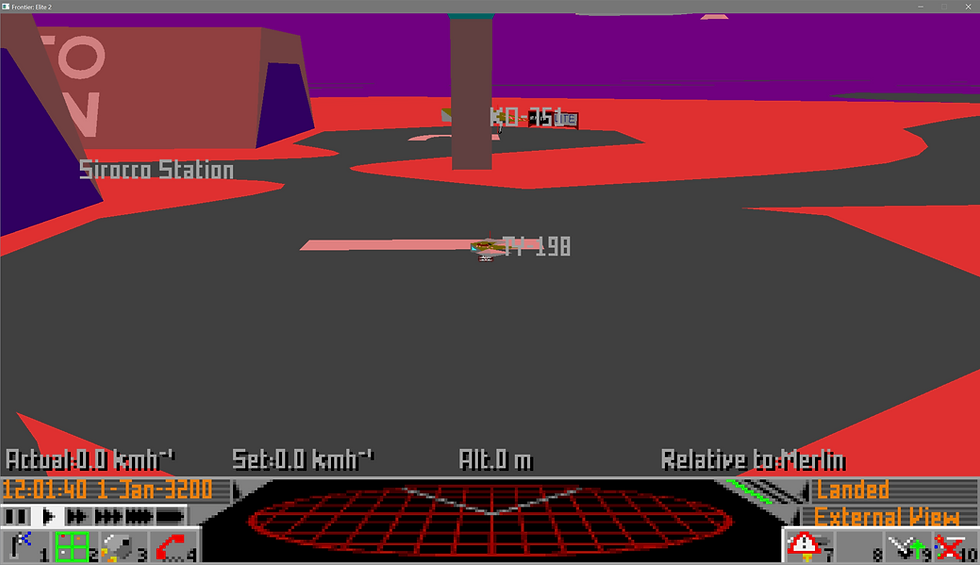
glFrontier does suffer from significant glitches and issues and it is left to personal preference as to whether glFrontier or the DOS version of FE2 is used.
There are currently three glFrontier releases:
The original glFrontier by Tim Morton.
A later Win32 release, GLFrontier-win32 from Kochise.
The GLFrontier-Extended from Brett Wilson that adds Android support and touch screen controls.
As glFrontier is reversed engineered from the Atari ST version, the DOS version is not required to run glFrontier.
Obtaining
The original glFrontier can be obtained from the following sites:
GLFrontier Project Page (courtesy of the Wayback Machine).
SpaceSimCentral (requires registration).
The Win32 release, GLFrontier-win32 can be obtained from:
The GLFrontier-win32 GitHub repository.
GLFrontier-Extended can be obtained from:
The GLFrontier-Extended GitHub repository.
Running
The original glFrontier will often fail to setup the window or screen resolution properly resulting in an immediate crash. The game may need to be restarted multiple times until it is successful and the intro movie begins.
GLFrontier-win32 and GLFrontier-Extended seem to employ a more robust setup that fails less often.
GLFrontier-win32 seems to have particular problems with saving progress. At present compatibility options don't seem to solve this problem.
Command line options
The following command line options are supported across all versions:
Usage:
 frontier [options]
Where options are:
  --help or -h          Print this help text and exit.
  --fullscreen or -f    Try to use fullscreen mode.
  --nosound             Disable sound (faster!).
--size w h Start at specified window size.Note: the usage should state:
glfrontier [options]Additional in-game commands
These are glFrontier commands only:
F11 | Toggle fullscreen. |
Ctrl-E | Toggle hardware GL / original software renderers. |
Ctrl-M | Toggle mouse grabbing. |
F | Toggles some debug info & fps readout. |
Ctrl-Q | Quits the game. |
Joystick issues
According to the code in the glFrontier project, there doesn't seem to be any support for joystick or HOTAS devices despite the Joystick control option present in the in-game options menu.
Example video
Finally...
Credit and thanks for the FE2 information goes to:
Frontier Developments for the digital/shareware release of FE2 and supporting documents.
George Hooper for the First Encounters fan site.
Robin Sharrock for the Frontierverse fan site.
The creator/maintainer of the FrontierAstro fan site.
The creator/maintainer of the 'Life on the Frontier' fan site for info and hosting documents.
The Internet Archive for hosting patches, documents and the Wayback Machine.
The DOSBox Staging wiki maintainers for FE2 game issues and solutions.
Tony Dillon for The Secrets of Frontier Elite.
Christoph Tietz for compiling the FE2 FAQ and the Jades fan site for hosting it.
JimPlaysGames for the Frontier Fundamentals video series.
Andrea Villa for the Control mod.
Credit and thanks for the glFrontier information goes to:
Tom Morton for glFrontier.
Kochise for GLFrontier-win32.
Brett Wilson for GLFrontier-Extended.
FrontierAstro and SpaceSimCentral for hosting glFrontier.
Good hunting/trading/mining/piracy!


Comments