


Wing Commander IV: The Price of Freedom: Vigilance in DOSBox and Windows

Wing Commander IV: The Price of Freedom takes place in the aftermath of the events in Wing Commander III: The Heart of the Tiger and finds our protagonist, Colonel Christopher Blair (Mark Hamill) having retired retired from military service for the simple, peaceful life of a farmer.
But the hard fought for peace is at risk from Border World separatists intent on independence from the Confederation. Attacks from the separatists draw Colonel Blair back into the conflict, as he tries to discover who is really orchestrating the events drawing the Confederation ever closer to another war...
Contents
Strategy
The strategy will cover the DOS version followed by the WIndows version.
WC4 made the switch from MIDI to digital music, which means there aren't multiple music options available, through DOSBox, with the DOS version (unlike Wing Commander III). This means the DOS version uses a fairly straightforward DOSBox configuration. The DOS version also installs a launcher menu so a separate one is unnecessary.
The Windows version will cover converting the DOS game to Windows, the Windows CD-ROM and digital versions, followed by modern enhancement patches that ensure Win10 compatibility, quality of life improvements (e.g. controller settings) and the adding of higher quality movies.
The Wing Commander IV Enhancement Patch providing increased Win10 compatibility will only work with a very specific retail DVD release of the game, which was used as the basis for the digital release. However applying certain patches and creating a 'digital release like' install will allow single and dual layer DVD images to work.
Version & patch history
The version and patch history provides an overview of the various releases over time and the patches they support. Not only is this useful for a DOS based DOSBox release or native Win10 release but may also be of use to those wishing to run the game on legacy hardware. This also helps avoid downloading patches that aren't required.

DOS CD-ROM retail release (January 1996)
The initial CD-ROM retail released occurred in January 1996. The game was distributed on, unprecedented at the time, 6 x CD-ROMs. The initial release only included the DOS version. This can be considered the v1.0 release.
WC4JOY.DLL - Joystick Patch for Notebook Gameport w/ Wing Commander IV (February 1996)
Taken from the release notes:
WC4JOY.DLL is a set of alternate joystick routines used to provide support for Colorado Spectrum's Notebook Gameport. Joysticks tested with the Notebook Gameport in combination with this patch include the CH Flightstick, the CH Flightstick Pro, the Thrustmaster FCS, the Gravis Analog Pro, and the Microsoft Sidewinder 3D Pro.
This patch is not required when using DOSBox, it is only recommended for those running the game on legacy PCs with the affected hardware. This patch is available from:
Wing Commander CIC, Wing Commander Encyclopedia, Colorado Spectrum Joystick Patch (Wing Commander IV).
WC4JOY.DLL for Wing Commander IV : The Price of Freedom (February 1996)
Taken from the release notes:
WC4JOY.DLL is a set of alternate joystick routines. If you are experiencing lockups, bad calibration data, or any other problems concerning joystick calibration, you may want to give this alternate set of routines a try.
This patch is not required when using DOSBox, it is only recommended for those running the game on legacy PCs that experience problems with joystick calibration. This patch is available from:
Wing Commander CIC, Wing Commander Encyclopedia, Joystick Patch (Wing Commander IV).
Internet Archive, Wing Commander IV (Alternate Joystick Routine).
WC4PATCH for Wing Commander IV : The Price of Freedom (March 1996)
This patch is available for the English language and French & German language versions. Taken from the release notes:
WC4PATCH was written to address 16-bit SVGA palette problem found with video cards using the S3 Vision 968 chipset and the IBM RGB524 RAMDAC. Cards we know Wing Commander IV has a problem with include the Hercules Graphite Terminator Pro 64 PCI and the STB Velocity PCI.
This patch is not required when using DOSBox, it is only recommended for those running the game on legacy PCs with the affected hardware. This patch is available from:
Wing Commander CIC, Wing Commander Encyclopedia, 16 bit SVGA Patch (English).
Wing Commander CIC, Wing Commander Encyclopedia, 16 bit SVGA Patch (German & French).

DOS/Win95 CD-ROM retail release (October 1996)
In October 1996 the first re-release took place. This version included both the DOS and Win95 versions of the game distributed on 6 x CD-ROMs. This is the v1.1 release.
Windows 95 Upgrade (October 1996)
Around the same time as DOS/Win95 re-release, the Windows 96 Upgrade patch was released for DOS only versions providing updates to add a WIndows executable to play the game. Taken from the release notes:
Thank you for downloading Wing Commander IV for Windows 95 (WC4WIN95). To install and run Wing Commander IV for Windows 95, you must have the DOS version installed. In addition, you will need Microsoft's DirectX 2. You can obtain DirectX 2, from our web page. For more information on DirectX 2, consult the README95.TXT file included in this package.
This patch is not required when using DOSBox. It is a recommended patch for those with a DOS only version but wishing to use an enhanced Windows versions. It is available from:
Wing Commander CIC, Wing Commander Encyclopedia, Windows 95 Upgrade.
Internet Archive, Wing Commander IV Upgrade to Windows 95.
Creative OEM DVD-ROM release (1997)
WC4 was bundled with the Creative PC-DVD Encore DXR, a hardware based PCI MPEG-2 and DVD decoder card. This version used the enhanced DVD quality videos and was distributed on 2 x DVD-ROMs. This is version v2.0.
Win95 DVD-ROM release (1997)
This is the retail version of the Creative OEM DVD-ROM release. This version used the enhanced DVD quality videos and was distributed on 2 x DVD-ROMs. This is version v2.0.
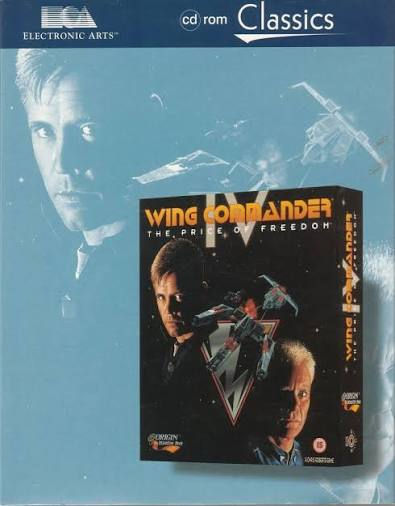
DOS/Win95 CD-ROM EA Classics release (1998)
WC4 was be re-released in 1998 as part of the EA Classics range in 1998. This version is equivalent to the DOS/Win95 CD-ROM retail release in October 1996. It was distributed on 6 x CD-ROMs.
MCI to DirectShow Interface (April 2004)
A fan made patch created by gulikoza. The v1.0 version of the patch (dxmci10.zip) was released in April 2004, with the final v1.5 version (dxmci15.zip) released in January 2008. Taken from the release notes:
Some of the older games still rely on the old MCI interface. This is a very old standard, dating from Win 3.1 and has been replaced by DirectX. Although Windows XP still contains MCI, many of the applications no longer function as they are supposed to. This library will translate MCI calls to a more modern DirectShow.
This patch is a recommended patch for Win95 DVD releases. It is available from:
Wing Commander CIC, Wing Commander Encyclopedia, Play DVD Version Without DxR Board.
Windows 95 Upgrade Windows 2000 Patch (May 2004)
A fan made patch created by NStriker. This patch is applied after the Windows 95 Upgrade, it fixes an API call allowing the game to run under Win2000.
This patch is only recommended for those using legacy Win2000/XP hardware. It is available from:
Wing Commander CIC, Wing Commander Encyclopedia, Windows 95 Upgrade Windows 2000 Patch.
Wing Commander IV DVD Windows 2000 Patch (May 2004)
A fan made patch created by NStriker. This patch is applied after the MCI to DirectShow Interface/Play DVD Version Without DxR Board patch. It allows the game to be played in Win2000 without DXR hardware.
This patch is only recommended for those using legacy Win2000/XP hardware to play a DVD version. It is available from:
Wing Commander CIC, Wing Commander Encyclopedia, Wing Commander IV DVD Windows 2000 Patch.
Wing Commander IV DVD Windows 2000 Patch with alternate mpeg2.dll (May 2004)
A fan made patch created by NStriker. This is an alternate patch to use if the Wing Commander IV DVD Windows 2000 Patch does not work. It should be applied after the MCI to DirectShow Interface/Play DVD Version Without DxR Board patch. It allows the game to be played in Win2000 without DXR hardware.
This patch is only recommended for those using legacy Win2000/XP hardware to play a DVD version and the Wing Commander IV DVD Windows 2000 Patch has failed . It is available from:
Wing Commander CIC, Wing Commander Encyclopedia, Wing Commander IV DVD Windows 2000 Patch with alternate mpeg2.dll.
GPL MPEG-2 decoder filter (April 2004)
A fan made patch created by NStriker. This patch should be used with the Wing Commander IV DVD Windows 2000 Patch with alternate mpeg2.dll patch.
This patch is only recommended for those using legacy Win2000/XP hardware to play a DVD version and using the Wing Commander IV DVD Windows 2000 Patch with alternate mpeg2.dll patch. It is available from:
Wing Commander CIC, Wing Commander Encyclopedia, GPL MPEG-2 decoder filter.
Mincemeat's WC Superpatch v0.3 (March 2006)
A fan made patch created by Mincemeat. The v0.1 version of the patch was released in March 2006, with the final v0.3 version released in May 2010. Taken from the release notes:
This is a collection of Application Compatibility fixes for various Wing Commander games for Microsoft Windows XP. It should save the player from having to manually configure compatibility settings in order to play. At the time of release of Windows XP, Microsoft has built-in some compatibility fixes, but they were either incomplete or do not successfully cater to the myriad of system configurations in existence. Always try playing without any compatibility fixes first. You might not need this at all!
This patch is only recommended for those using legacy Win2000/XP hardware experiencing compatibility issues. It is available from:
Wing Commander CIC, Wing Commander Encyclopedia, Compatibility Super Patch.
DVD Upgrade Patch (August 2010)
A fan made patch created by PopsiclePete. This is a modified installer which works with both the DOS and Win95 CD versions of the game. It creates a new install or modifies an existing install, adding a Win95 DVD executable to make it compatible with the DVD version of movies. Once complete DVD movie packs are installed into the appropriate folder.
This patch is only recommended for those using legacy Win2000/XP hardware using the CD version of the game, It (and the movie packs) are available from:
Wing Commander CIC, Wing Commander Encyclopedia, DVD Upgrade Patch.
DirectDraw Hack (September 2010)
A fan made patch created by Jari Komppa. This is a modified DirectDraw wrapper for the Windows versions of Wing Commander 1, 2, 3 and Wing Commander 4 for use with Win7. The current version is v1.0.
This patch is only recommended for those using legacy Win7 hardware using the Windows version of the game. It is available from:
Wing Commander CIC, Wing Commander Encyclopedia, DirectDraw Hack.
Digital release (2012)
The digital release of WC4 was published on the gog.com platform. It is equivalent to a Win95 DVD-ROM release using the higher quality DVD movies. It can be considered version v2.0.

GOG WC4 Video Patch (December 2013)
A fan made patch created by HCl. It fixes a bug in the gog.com WC4 release where movie sequences have sound but no picture.
This patch is recommended for those using the gog.com digital release experiencing the problem or for Win95 DVD releases.. It is available from:
Wing Commander CIC, Wing Commander Encyclopedia, GOG WC4 Video Patch.
Wing Commander 4 HD Video Pack (October 2020)
A fan made patch created by ODVS. The patch adds enhanced movies to the DVD version of the game. The latest and definitive version is v5.0. Taken from the release notes:
All FMV footage remastered to 1080p Full HD using Machine Learning AI Low frame rate sequences remastered to full 30fps using Machine Learning AI Aspect ratio of all footage fixed to standard 16:9 Missing audio from various DVD-version sequences restored (in full Dolby Digital 5.1 surround sound where possible) French and German packs available (Stereo audio only) Custom batch file launcher for French and German packs (wc4dvd_FR.bat and wc4dvd_DE.bat respectively) included. Use these to launch the game with French or German UI enabled (tool tips, mission briefings, pilot bios, ship loadouts etc.)
This is a recommended patch, it is available from:
Wing Commander CIC, Wing Commander Encyclopedia, Wing Commander 4 HD Video Pack.
Wing Commander IV Enhancement Patch (April 2025)
A fan made patch created by Matt Wells. This patch improves compatibility with Win10/11. There is a Windows patch version and gog.com DVD version of the enhancement patch. The latest version is v0.9.7. Taken from the project description:
This patch was created for the PC game "Wing Commander IV" with the Windows 95 Upgrade Patch installed. UPDATE: This patch now also works with the GOG DVD version "wc4dvd.exe". This patch uses DirectX 11 for rendering and will likely require Windows 10 or greater to use. This patch makes use of DLL injection to make changes to the game's executable file. And is loaded by the game itself by pretending to be the Direct Draw library file "ddraw.dll". It is thus incompatible with patches which use the same method to load eg. DirectDraw_Hack. HD Movie playback is achieved using libvlc. Current list of enhancements: HD Space, space scenes are displayed at your desktop resolution(formerly 640x480). Support for the Wing Commander 4 HD Video Pack created by ODVS. Improved windowed mode, with window resizing options and mouse locking only when required in-game. Ingame Joystick\Controller configuration utility.
This is a recommended patch, it is available from:
GitHub, mattwells77, Wing_Commander_IV_Enhancement_Patch.
Wing Commander Enhancement Patch VLC libraries (March 2025)
As the above description notes, 'HD Movie playback is achieved using libvlc.'. This required obtaining all the VLC libraries as part of one complete [package. The Wing Commander Enhancement Patch VLC libraries (libvlc_min_pack_3.0.21) are the minimal set of VLC libraries required by the enhancement patch.
Note: This is the same VLC libraries patch as used by the Wing Commander III Enhancement Patch.
This is recommended patch when running the enhancement patch. It is available from:
GitHub, mattwells77, Wing_Commander_III_Enhancement_Patch, Releases, libvlc_min_pack_3.0.21
Patching strategies
The following are not guides but patching strategies, listing the suggested patches to use in various scenarios. This allows the patches to be obtained before starting the patching process.
Windows 10/11
DOS retail releases (DOSBox)
Install DOS version.
DOS retail releases (enhanced)
Install DOS version.
Apply Windows 95 Upgrade.
Apply Wing Commander IV Enhancement Patch.
Apply Wing Commander Enhancement Patch VLC libraries.
Apply Wing Commander 4 HD Video Pack.
Win95 CD-ROM retail release (enhanced)
Install Win95 version.
Apply Wing Commander IV Enhancement Patch.
Apply Wing Commander Enhancement Patch VLC libraries.
Apply Wing Commander 4 HD Video Pack.
Win95 DVD retail release (enhanced)
Install Win95 version.
Apply MCI to DirectShow Interface..
Apply GOG WC4 Video Patch.
Apply Wing Commander IV Enhancement Patch.
Apply Wing Commander Enhancement Patch VLC libraries.
Apply Wing Commander 4 HD Video Pack.
Digital release only
Install digital release.
Optional: Apply GOG WC4 Video Patch.
Digital release (enhanced)
Install digital release.
Apply Wing Commander IV Enhancement Patch.
Apply Wing Commander Enhancement Patch VLC libraries.
Apply Wing Commander 4 HD Video Pack.
Legacy hardware Win95/98
Note: These patching strategies are suggestions only and have not been tested,
Legacy hardware (Win95/98 CD-ROM)
Install DOS or Win95 version.
Apply Windows 95 Upgrade (if DOS version installed).
Legacy hardware (Win95/98 CD-ROM, enhanced)
Install DOS or Win95 version.
Apply DVD Upgrade Patch.
Legacy hardware (Win95/98 DVD-ROM)
Install Win95 version.
Legacy hardware 2000/XP
Note: These patching strategies are suggestions only and have not been tested,
Legacy hardware (Win2000/XP CD-ROM)
Install DOS or Win95 version.
Apply Windows 95 Upgrade (if DOS version installed).
Apply Windows 95 Upgrade Windows 2000 Patch (May 2004).
Optional: Apply Mincemeat's WC Superpatch v0.3 (May 2010).
Legacy hardware (Win2000/XP CD-ROM, enhanced)
Install DOS or Win95 version.
Apply DVD Upgrade Patch.
Apply MCI to DirectShow Interface.
Apply Wing Commander IV DVD Windows 2000 Patch.
Optional: Apply Wing Commander IV DVD Windows 2000 Patch with alternate mpeg2.dll.
Optional: Apply GPL MPEG-2 decoder filter.
Optional: Apply Mincemeat's WC Superpatch v0.3.
Legacy hardware (Win2000/XP DVD-ROM)
Install Win95 version.
Apply MCI to DirectShow Interface.
Apply Wing Commander IV DVD Windows 2000 Patch.
Optional: Apply Wing Commander IV DVD Windows 2000 Patch with alternate mpeg2.dll.
Optional: Apply GPL MPEG-2 decoder filter.
Optional: Apply Mincemeat's WC Superpatch v0.3.
Mods
The listed mods change aspects of the game or are an optional convenience, as such their use is a personal preference.
Hellcat Upgrade (December 1997)
A fan made mod from an unknown creator. This mod upgrades the Hellcat V weapons to Tachyon Cannons and Reaper Guns, as well as upgrades the maneuverability and speed of the fighter. It is compatible with DOS and Windows releases. It is available from:
Wing Commander CIC, Wing Commander Encyclopedia, Hellcat Upgrade.
Wing Commander IV launcher
A launcher menu for the DOS version of WC4 when running under DOSBox Staging emulation. It has option for:
Running the game.
Configuring the game.
Viewing the release notes.
It should be placed in the top level hdd folder, C:\ and assumes the default installation C:\WC4 is used in DOSBox. It is available below:
Retail media
Due to the age or the media and the drives required to read it, it is recommended to rip CD-ROM or DVD-ROM media to image files, to save wear and tear on media and the mechanical drives.
The CD-ROM/DVD-ROMs can be ripped to a data only .iso image format as there is no CD audio on the CD/DVDs.
Game management
It is recommended to use my DOSBox game management strategy or similar strategy you may have developed. The recommended game management folders for the DOS version are:
cd - for any CD/DVD images.
hdd - the folder use as the emulated DOSBox hard disk
conf - to store DOSBox and HOTAS configuration files.
docs - for documents.
patch - to store any patches.
When using the DOS version of the game, these management folders can be found in the following game folder (as an example):
D:\Games\Dos\Wing Commander 4When using the Windows version of the game (or converting to the Windows version, these management folders can be found in the following game folder (as an example):
D:\Games\Win\WC4 SetupAlongside the Win95 release WC4 installation folder:
D:\Games\Win\WC4HOTAS config
Configuring axes may not be required if your HOTAS has 4 axes or less. When using a combination of devices totaling more than 4 axes, a virtual controller can be configured (with vendor software or Joystick Gremlin), limited to 4 axes.
For those using controllers from multiple vendors, the vJoy/Joystick Gremlin combination may be required instead of vendor specific HOTAS profile software. You may also have to use HidHide as a device firewall, to hide your real controllers, so only the vJoy virtual controller is detected by DOSBox. [6][7][8].
There are separate configs for DOS and Windows versions.
DOS releases
This section of the guide deals with the DOS edition of the game and optimising the DOSBox configuration.
HOTAS config
Only the joystick is supported with the DOS version. The physical axes to Windows axes were configured as follows:
Physical axis | Windows axis |
Joystick x-axis | DX_X_AXIS |
Joystick y-axis | DX_Y_AXIS |
DOSBox Staging config
The DOS version is configured to run under the latest released DOSBox Staging version, v0.83.0-RC1 (at time of writing).
# This is the configuration file for Wing Commander IV: The Price of Freedom.

[render]
deinterlacing = on

[cpu]
cpu_cycles_protected = 100000
cycleup = 500
cycledown = 500

[voodoo]
voodoo = off

[mixer]
reverb = normal
chorus = medium

[joystick]
joysticktype = ch
timed = off
swap34 = on
deadzone = 0

[autoexec]
@echo off
mount c "D:\Games\Dos\Wing Commander 4\hdd" -freesize 1024
mount d "D:\Games\Dos\Wing Commander 4\cd\*.iso" -t cdrom
mixer master 100 /noshow

c:

# To run the game
# cd wc4
# wc4.exe

# To use the launcher mod
# call wc4menu.bat
The following zip file contains this example DOSBox Staging config. It should be changed to match your hardware and personal preferences.
DOSBox Staging introduces a new deinterlacer feature to remove black lines from full motion videos (FMVs). This is enabled in the [render] section of the config, there are additional settings to control the strength of the deinterlacing.
The cpu_cycle setting of 100000 cycles, equivalent to a Pentium MMX-166. cycleup/down settings are changed to values rather than percentages.
Voodoo emulation isn't required and is disabled.
The mixer settings are a personal preference.
The default Sound Blaster settings are appropriate for Sound Blaster music and digital sounds.
The joystick settings are a personal preference and suitable for my joystick hardware. A ch joystick type allows the joystick hat to be used in-game.
The autoexec mount settings are examples only, demonstrating how to mount multiple cd images for the DOS CD edition.
The mixer setting restores the master volume to 100%. The remaining commands run the game.
Installation and configuration
Installation should be performed under DOSBox emulation by running either of the following commands:
D:\> install.bat
D:\> wc4.exe -i
The following gallery shows the installation steps:
Selecting an installation folder, the default is fine.
The configuration can be re-run multiple times by running either of the following commands from the WC4 installation folder:
C:\WC4> install.bat
C:\WC4> wc4.exe -i
Running
The game can be run with the following command:
C:\WC4> wc4.exeWhen run for the first time with a joystick enabled, the joystick calibration menu is displayed, as shown below:
Beginning joystick calibration. Calibration complete. Note the centred cursor in the calibration window.
Windows releases
This section of the guide deals with upgrading the DOS release of the game and optimising the Windows releases. There is a section for upgrading a DOS release and a sections for installing Windows releases, followed by patching and configuration sections applicable to all supported releases.
Upgrading a DOS release
Before upgrading a DOS release using the Windows 95 Upgrade, it must be installed. The instructions above cover installing WC4 in DOSBox Staging. Once installed, it is recommended to copy the WC4 installation folder to preserve the DOS version. This can be done from Windows. An example is shown below:
The DOSBox WC4 installation folder is:
C:\WC4In Windows this becomes:
D:\Games\DOS\Wing Commander 4\hdd\WC4This folder is copied, in this example under the D:\Games\Win folder to become:
D:\Games\Win\WC4Applying the Windows 95 Upgrade patch
The steps to apply the Windows 95 Upgrade patch are as follows:
Download the patch and save in an appropriate folder, e.g.
D:\Games\Win\WC4 Setup\patchExtract the patch to a sub-folder, e.g. wc4win95.
Open a command (cmd) window and navigate to the Windows 95 Upgrade folder, e.g.
D:\Games\Win\WC4 Setup\patch\wc4win95Install the patch with the install batch file, specifying the WC4 installation folder, e.g.
D:\Games\Win\WC4 Setup\patch\wc4win95> install D:\Games\Win\WC4If successful you you should see something similar to the following in the cmd window:
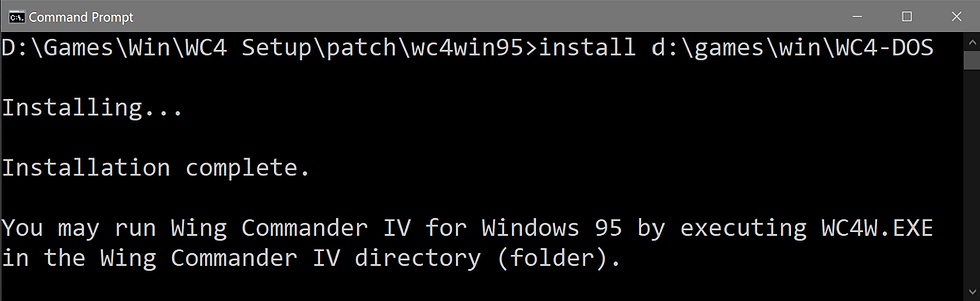
To continuing patching for an enhanced Win10 compatible version continue on to Patching.
Win95 CD-ROM release
Installing the Win95 CD-ROM release is straightforward as the installer is Win10 compatible. It can be found on the first CD/image:
setup.exeThe installation steps are shown in the gallery below:
Starting the installation. Selecting an installation folder, the default should be changed. Optionally confirming the folder, if it exists. Installation complete.
To continuing patching for an enhanced Win10 compatible version continue on to Patching.
Win95 DVD-ROM release
Installing the Win95 CD-ROM release is straightforward as the installer is Win10 compatible. It can be found on the first CD/image:
setup.exeThe installation steps are shown in the gallery below:
Starting the installation.
Note: Once installation is complete do NOT install DirectX 5.
Patching
The MCI to DirectShow Interface and GOG WC4 Video patches are applied with the following steps:
Extract the contents of the MCI to DirectShow Interface patch (dxmci15.zip) into the WC4 installation folder, replacing any files as required.
Extract the contents of the GOG WC4 Video patch (wc4gog_1.0.2_test1.zip) into the WC4 installation folder, replacing any files as required.
Delete or rename (recommended) wc4dvd.exe, e.g. wc4dvd.exe.bak.
Rename wc4dvdgog-win2k-patched.exe to wc4dvd.exe.
Fixing the dxmci configure shortcut
The dxmci configure shortcut shouldn't be required but it still may be useful to fix, if needed. To fix the shortcut.
Open the shortcut Properties.
The shortcut Target field will be:
%WINDIR%\system32\rundll32.exe dxmci,configureChange the Target field to:
%WINDIR%\system32\rundll32.exe dxmci.dll,configureCreating a 'digital like' installation
The final step in a DVD release installation is to create a 'digital like' installation. This allows the DVD/digital version of the enhancement patch to be used successfully. This method has been tested on single/dual layer DVD images, although it has not been tested with all DVD releases.
To create the 'digital like' installation:
Copy the following files from the DVD(s) to the WC4 installation folder, replacing any files as required:
From disc 1/side A:
\VOB (folder)
install.tre
movies1.tre
movies2.tre
movies3.tre
special1.tre
special2.tre
special3.tre
From disc 2/side B:
\VOB (folder)
movies4.tre
movies5.tre
movies6.tre
music3.tre
music4.tre
special4.tre
special5.tre
special6.tre
To continuing patching for an enhanced Win10 compatible version continue on to Patching.
Digital release
The digital release should be installed using the gog.com Galaxy client or offline installer package. It is recommended to take a copy of the WC4 installation folder to prevent any gog.com verification and repair of the game files from removing the enhancement patch or HD movie packs.
Copying the installation folder
Using the following gog installation folder as an example:
D:\Program Files (x86)\GOG Galaxy\Games\Wing Commander IVCopy this folder to an appropriate location (and rename if desired), e.g.
D:\Games\Win\WC4Removing unnecessary files
The new/copied installation folder includes a number of files that are no longer required and can be removed, detailed below:
\AC3Filter (folder)
\support (folder)
ac3.cmd
ac3filter.ax
ac3u.cmd
COPYING
dxmci15_src.zip
gog.ico
goggame-1207659021.hashdb
goggame-1207659021.info
goggame-1207659021.script
goggame-galaxyFileList.ini
goglog.ini
support.ico
unins000.dat
unins000.exe
unins000.ini
unins000.msg
wc4_debug.txtThe following files are not strictly necessary but may still prove useful:
goggame-1207659021.ico
Launch Wing Commander™ 4 - The Price of FreedomNote: In order to use the launch shortcut the Target field should be changed to point to the new WC4 installation folder.
The following documents can be moved to a separate game management docs folder for ease of reference:
Manual.pdf
Playguide.pdf
Patching
Once a DOS release is upgraded or Windows release installed, a number of patches are applied to improve Win10 compatibility and add the HD movie packs.
Applying the Wing Commander IV Enhancement Patch
The first patch to install is the Wing Commander IV Enhancement Patch. This comes in two versions:
A DOS/Win95 CD-ROM release version (wc4w_en_0.9.7.zip).
A Win95 DVD-ROM/digital release version (wc4w_en_DVD_0.9.7.zip).
In addition the Wing Commander Enhancement Patch VLC libraries should also be obtained.
The installation steps are identical for both versions:
Extract the contents of Wing Commander IV Enhancement Patch zip archive into the WC4 installation folder, replacing any files as required.
Extract the contents of Wing Commander IV Enhancement Patch VLC libraries zip archive into the WC4 installation folder, replacing any files as required.
Applying the Wing Commander 4 HD Video Pack
If you wish to use HD movies, the Wing Commander 4 HD Video Pack is available in English, French or German languages. The pack is distributed as 2 zip archives, (using the English language version), wc4_hdpack_5.0_01.zip and wc4_hdpack_5.0_02.zip.
The installation steps are as follows:
Locate the vob sub-folder in the WC4 installation folder, e,g,
D:\Games\Win\WC4\vobExtract the contents of each zip archive into the vob sub-folder, replacing any files as required.
Running
CD Retail releases of the game should be run with the first CD/image mounted in Win10. The game is run with the following executable:
wc4w.exeThe DVD/digital version of the game is run with a suitable launch shortcut or the following executable:
wc4dvd.exeFirst run
When the Retail CD release of the game is run for the first time (with the Wing Commander IV Enhancement Patch), it may take a little time to start, then run a speed test and open the configuration options.
It is recommended to check the sound and graphics options (which should be at the maximum settings) and use the copy additional files option to copy all the additional files from the CD/image, The menu is very similar to the DOS i configuration menu (see Installation and configuring).
The DVD/digital release of the game will start normally.
Configuration
With the addition of the patch and native controller support, there's some additional configuration to optimise the game.
Configuration options are shown in the gallery below. In-game config options set from the Main Terminal (in-game). The Joystick Calibration button now opens a new native controller configuration dialog.
Main terminal options. The new joystick setup options dialog box. In-flight options.
Finally, when in flight, Alt + O will open the in-flight options.
HOTAS config (optional)
The new controller support means the game can now support stick, throttle and rudder pedals.
It would seem there is no need for an external HOTAS config, however, the Controller Setup dialog will list all controller devices as 'HID compliant device'. This makes configuration 'trial and error' until the correct controller and axis is located.
Note: this is an entirely optional step. Creating a virtual controller with the 4 axes supported in-game means only a single controller is available with only the required 4 axes, which may make thing easier. This also allows the advanced facilities available to the HOTAS profiling software to be used, e.g. button macros, chained commands, etc.
It is recommended to map physical to Windows axes as follows:
Physical axis | Windows axis |
Joystick x-axis | DX_X_AXIS |
Joystick y-axis | DX_Y_AXIS |
Throttle | DX_Z_AXIS |
Rudder | DX_ZROT_AXIS |
Documents
The following documents are available:
Digital release
The following documents are bundled with the game:
Playguide.
Manual.
Additional documents can also be downloaded separately as extras:
Playguide.
Manual.
Origin official guide.
Reference card.
Production videos.
Promotional videos.
Wallpapers.
Wing Commander bible.
Wing Commander IV script.
Other releases
Documents available for other releases:
Wing Commander IV manual, pdf download
Wing Commander CIC, Wing Commander Encyclopedia, Wing Commander IV Manual.
Internet Archive, Wing Commander IV: The Price Of Freedom User Manual.
Playguide, pdf download.
Wing Commander CIC, Wing Commander Encyclopedia, Wing Commander IV: The Price of Freedom Playguide.
Internet Archive, Wing Commander IV: The Price Of Freedom User Manual.
Reference card, pdf download.
Wing Commander CIC, Wing Commander Encyclopedia, Wing Commander IV Reference Card.
Internet Archive, Retro Game Reference Material.
Installation guide, pdf download.
Internet Archive, Wing Commander IV: The Price Of Freedom User Manual.
Installation guide, Win95 updated information, pdf download.
Internet Archive, Wing Commander IV: The Price Of Freedom User Manual.
Ship statistics, txt download.
Wing Commander CIC, Wing Commander Encyclopedia, Wing Commander IV Shipstats.
Strategy guides
Origin's Official Guide to Wing Commander IV: The Price of Freedom, pdf download.
Internet Archive, Wing Commander IV Guide.
Internet Archive, Wing Commander IV The Price of Freedom Official Strategy Guide.
Example videos
Finally...
Credit and thanks for all the hard work involved goes to:
Wing Commander CIC, for all the patches, forums, contributors, documents, in fact the premiere resource for Wing Commander franchise information on the Internet.
Internet Archive for hosting documents and patches.
gulikoza for the MCI to DirectShow Interface patch.
NStriker for the Windows 95 Upgrade Windows 2000, Wing Commander IV DVD Windows 2000, Wing Commander IV DVD Windows 2000 Patch with alternate mpeg2.dll and GPL MPEG-2 decoder filter patches.
Mincemeat for Mincemeat's WC Superpatch.
PopsiclePete for the DVD Upgrade Patch.
Jari Komppa for the DirectDraw Hack.
HCl for the GOG WC4 Video Patch.
ODVS for the Wing Commander 4 HD Video Pack.
Matt Wells for the Wing Commander IV Enhancement Patch.
John Novak and the DOSBox Staging team for DOSBox Staging v0.83.0-RC1.
The developers and maintainers of vJoy, Joystick Gremlin and HidHide.
Dedicated to my favourite girl, Kimbo.
Good hunting!

Comments