


F22 Air Dominance Fighter (2026 edition): Font of sound knowledge

This article covers adding enhanced MIDI components to the 2026 edition of F22 Air Dominance Fighter (ADF). We'll start with a quick history, explain what it means for ADF and then move on to installing some recommended apps to restore missing MIDI features. Much of this has been taken from the guides for the original ADF and Total Air War (TAW), only the sections relevant to the 2026 edition are included.
Note: At present the soundfonts that were included with the original ADF (are also the same soundfonts supplied with TAW) are not included with the 2026 edition. Hopefully they can be included in a future update. For now they will have to be obtained from an original retail cd or cd image.
History
In the early days of DOS, the MT32 synthesizer was the optimum way to play music (encoded in the proprietary MT32 format) in games. Each game required you to choose the MT32 device when configuring the game.
A few years later and the proprietary MT32 was supplanted by General MIDI supported by a wide variety of sound cards at the time. Again, MIDI music options required a suitable MIDI capable sound card to be selected when configuring.
With the advent of Windows, MIDI was still in use but was in decline, being replaced by audio music tracks on cd or by digital musc. However, Windows games no longer required the user to select a MIDI device for each game, the game would simply 'hand off' the midi music to the MIDI components within Windows. The user could use the default Windows MIDI synth or select the MIDI synth provided by a sound card for all MIDI music.
As MIDI music declined there was a corresponding decline in the MIDI feature set offered by later iterations of Windows. Today we have the rather basic default Windows MIDI synth with a limited set of features. An alternative MIDI device with a richer feature set can't be selected. Soundfonts, which change the sound of each MIDI instrument and can substantially change the music landscape of a game aren't supported.
What this means for F22 Air Dominance Fighter
ADF being the 2026 edition of a much loved classic and enhanced for modern hardware continues to use MIDI music. However, under WIn10/11 is very much constrained by the MIDI facilities provided by these Windows OS's.
The original ADF and it's sequel TAW, even had a set of it's own soundfonts for use with the Creative AWE 32 sound card.
This means it can only play MIDI music using the default Windows MIDI synth (which does not support soundfonts). This is not an oversight from the developers, simply the reality of playing MIDI music on a modern Windows OS.
However, third party apps have been created to restore this lost MIDI functionality. Coolsoft has created VirtualMIDISynth, a MIDI synth that allows soundfonts to be used and MIDIMapper which allows an alternative to the default Windows MIDI synth, (like VirtualMIDISynth) to be used as the default MIDI device.
Once properly configured the apps allow ADF to play MIDI music with VirtualMIDISynth using soundfonts (including the original ADF's own soundfonts).
If you have used soundfonts in DOSBox, then you're probably aware the developers of modern DOSBox variants like DOSBox Staging and DOSBox-X have had to do something similar by integrating the fluidsynth component into DOSBox to add improved MIDI and soundfont support.
VirtualMIDISynth and MIDIMapper
Installing and configuring these utilities is optional if you prefer to run ADF without MIDI music and just wish to use sound fx and speech.
If you have previously installed VirtualMIDISynth and MIDIMapper to play the original F22 ADF or TAW, then you don't need to install them again, you're all set.
If you only installed VirtualMIDISynth then it's time to install MIDIMapper as ADF does not allow you to choose a preferred MIDI device (this is done by MIDIMapper, see below).
If you haven't installed either then...
The first step is to download and install VirtualMIDISynth, as described in the article, DOSBox Staging and VirtualMIDISynth. The DOSBox Staging config section can be ignored, as we aren't using DOSBox.
Then download and install MIDIMapper, which will integrate with VirtualMIDISynth, as described in the earlier article, VirtualMIDISynth and MIDIMapper.
Now we select VirtualMIDISynth as the default MIDI device with the MIDIMapper configurator:
Run the MIDIMapper Configurator.
Choose VirtualMIDISynth as your preferred default MIDI device.
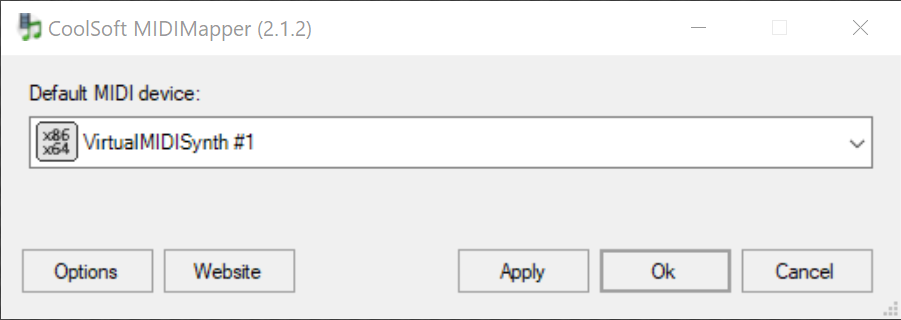
Or with the VirtualMIDISynth configurator (that integrates with the MIDIMapper):
Run the VirtualMIDISynth Configurator.
Select the MIDI Mapper tab.
Choose VirtualMIDISynth as your preferred default MIDI device.

As shown above, both utilities allow you to do the same thing and set the default MIDI device. That concludes installing and configuring VirtualMIDISynth and MIDIMapper, adding the soundfonts is next.
Soundfonts
This is optional is also optional if you added the soundfonts earlier when setting up the MIDI music for original ADF or TAW. They have already been added to VirtualMIDISynth and are still available.
Original ADF and TAW has three soundfonts, (one for each of the Creative AWE 32 sound card memory configurations, so each soundfont is a different size), as described below:
File | Size |
tfx3512.sf2 | 443 KB |
tfx31meg.sf2 | 897 KB |
tfx3.sf2 | 1.4 MB |
You may add all three to VirtualMIDISynth, but only one should be active when playing. It's recommended the largest soundfont (tfx3.sf2) be used, as it provides the highest quality music. To configure VirtualMIDISynth:
Run the VirtualMIDISynth Configurator app.
Add the original ADF (or TAW) soundfonts to VirtualMIDISynth and select one of them (tfx3.sf2 recommended).

This concludes adding the original ADF soundfonts to the 2026 edition.
Other soundfonts
Now that you have soundfonts set up and working you should feel free to experiment with others, you may find a favourite, here are a few examples to try:
Fluid R3 - a retro sounding soundfont by Frank Wen.
Shan SGM Pro 12 - a very large and impressive soundfont, created by David Shan.
Timbres Of Heaven - a very large and 'expansive' soundfont created by Don Allen.
Finally...
Credit and thanks go to:
Krishty and bored for their amazing work on F22 Air Dominance Fighter (2026 edition).
The Coolsoft developers for VirtualMIDISynth and MIDIMapper.
Frank Wen, David Shan and Don Allen for their soundfonts.
Good hunting!

very use ful